How Can We Help?
01 – Duplicate Accounts
Do a daily search to find and resolve duplicate accounts.
- Start in the Account Processing Component of the Accounts and Transactions module.
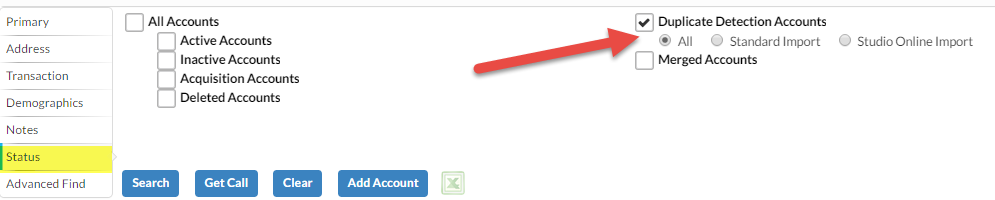
- Navigate to the Status tab on the Lookup.
- Change the filter to have the Duplicate Detection Accounts option checked, and nothing else. Choose the All filter.
- Select the All option under the Duplicate Detection Accounts then perform the Search.

- Select the first Account record in the list and then navigate to the Possible Duplicates Activity to see a list of the possible duplicate records that already exist.
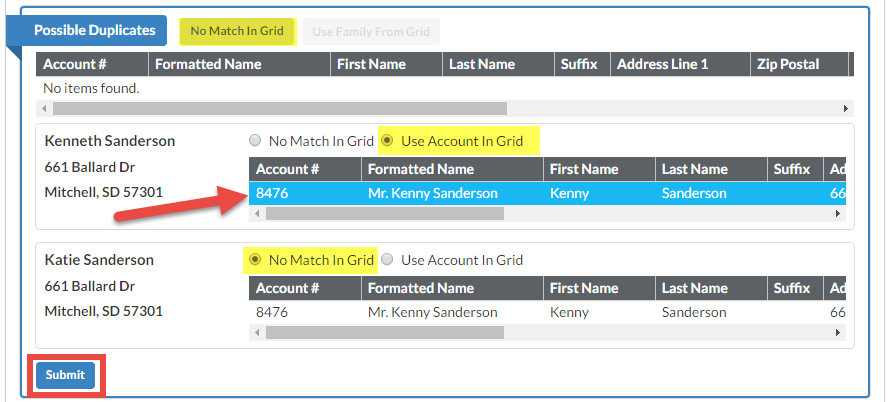
- Most potential duplicates can be resolved quickly. Check the accounts in the Possible Duplicates grid for a name and address match. The name may be a slight variation, such as Tom instead of Thomas. If duplicate is found, highlight the duplicate in the grid and click the Use Duplicate button.


Family Accounts
If the selected record is part of a Family, then several possible duplicates will be displayed under this Activity – one for each Spouse Account and one for the Family Account.
Once a selection has been made for each member of the family, select the Submit button at the bottom of the Activity display to resolve the possible duplicates and remove them from the pending list.